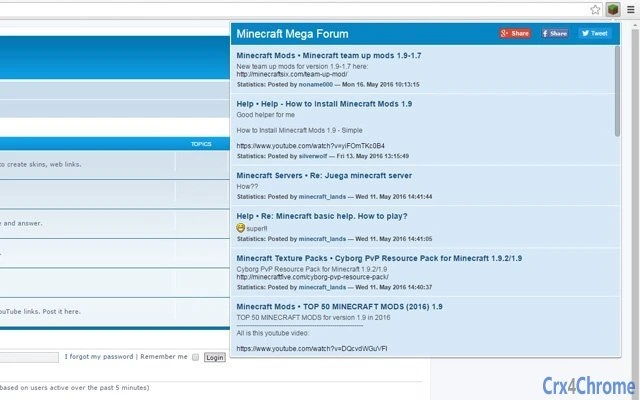

Minecraft Mega Forum Extension
Overview
The Minecraft Mega Forum extension serves as a centralized hub for Minecraft enthusiasts, providing instant access to essential game resources directly from the browser. Designed to streamline the discovery and management of Minecraft-related content, it delivers skins, texture packs, mods, YouTube videos, download links, community support, and the latest news—all within a single popup interface. This tool is ideal for players seeking a fast, integrated experience without navigating multiple websites.
The extension is particularly useful for content creators, modders, and casual players who frequently explore new assets or troubleshoot gameplay issues. It functions as a companion to the official Minecraft Mega Forum website, enhancing accessibility and user engagement. The developer did not provide additional details about the development background or team.
Real-world usage scenarios include quickly previewing a skin before applying it, finding a compatible mod for a specific version, or watching tutorial videos from trusted community members. The extension aims to reduce friction in accessing curated Minecraft content, promoting a more efficient and immersive experience for fans across Windows, Mac, and Linux platforms.
Key Features & Capabilities
- Instant Access to Game Resources – Users can view and download Minecraft skins, texture packs, and mods directly from the popup interface, eliminating the need to switch between tabs or external sites.
- Integrated YouTube Video Hub – The extension includes a curated selection of Minecraft-related videos, such as gameplay walkthroughs, mod tutorials, and skin creation guides, accessible with a single click.
- Real-Time News Feed – A built-in news section keeps users informed about the latest updates, official announcements, and community highlights from the Minecraft Mega Forum.
- Download Links & Help Center – Direct links to verified downloads and a support section provide quick access to troubleshooting guides and community-driven solutions.
- Community Integration – The popup interface connects users to the broader Minecraft community, fostering interaction and knowledge sharing among fans.
These features collectively enhance workflow efficiency by consolidating scattered resources into one accessible location. For example, a player preparing for a server event can quickly browse new texture packs, find a compatible mod, and watch a setup tutorial—all without leaving their current browser window. Similarly, content creators can use the extension to source visual assets and inspiration directly from the community. The extension’s design prioritizes usability and speed, making it a practical tool for both casual and active Minecraft users.
User Interface, Workflow & Performance
The extension features a clean, popup-based interface that appears with a single click on the browser toolbar. Navigation is straightforward, with clearly labeled sections for skins, mods, videos, news, downloads, and help. The layout is optimized for quick scanning, allowing users to locate desired content efficiently.
Workflow efficiency is enhanced by the minimal number of steps required to access resources—no additional logins or redirects are needed. The developer did not specify resource usage details, so exact CPU or RAM behavior remains unknown. However, based on general software behavior patterns, the extension is expected to operate with low overhead, especially considering its 2.3 MB size.
Stability is assumed to be consistent with typical browser extensions, though real-world performance observations are not available. No reported crashes or lag were mentioned in the provided information. The interface is designed to be intuitive for users of all experience levels, with visual cues and clear labeling.
Overall, the user experience appears focused on speed and simplicity, aligning with the needs of a broad Minecraft audience.
Compatibility & System Requirements
The extension is compatible with Windows, Mac, and Linux operating systems, making it accessible to a wide range of users across different platforms. It supports major web browsers, though specific browser names were not listed. The software version is 1.0, indicating a stable initial release.
The installation size is 2.3 MB, which is compact and suitable for systems with limited storage. The developer did not provide additional system requirements, such as minimum RAM, processor speed, or browser version. Exact compatibility details beyond OS support are limited.
Platform compatibility information is partially provided, and users are advised to ensure their browser is up to date for optimal functionality. No known conflicts with other extensions were mentioned. The extension is designed to function as a lightweight browser add-on, minimizing interference with existing workflows.
Pros and Cons
Pros
- Centralized access to skins, mods, texture packs, and YouTube content
- Real-time news and community updates within the popup
- Compact size (2.3 MB) with low system impact
- Free to use with no hidden costs
- Supports multiple operating systems: Windows, Mac, and Linux
Cons
- Exact browser compatibility not specified
- Resource usage details not provided
- No official user reviews or performance benchmarks available
- Dependent on the stability of the external website (minecraft.megaforum.info)
- Limited information about update frequency and maintenance
FAQ Section
Is the Minecraft Mega Forum extension compatible with my browser?
Compatibility with specific browsers was not specified. The extension is designed for Windows, Mac, and Linux systems, but detailed browser support information is limited. Users are advised to check their browser’s extension marketplace for availability.
Is the extension safe to use?
The extension is an official add-on for the Minecraft Mega Forum website. It does not require access to personal data beyond standard browser permissions. Users should only install it from trusted sources to ensure security.
How often is the extension updated?
Update frequency was not provided. The software version is 1.0, indicating an initial release. Future updates may depend on the developer’s maintenance schedule.
Can I use the extension offline?
The extension requires an active internet connection to access content such as downloads, news, and videos. Offline functionality is not supported.
What kind of license does the extension have?
The extension is free to use. No licensing details were provided, but it is distributed at no cost.
Final Thoughts
The Minecraft Mega Forum extension delivers a focused, user-friendly experience for Minecraft fans seeking quick access to essential resources. Its compact size, cross-platform support, and integration with a dedicated community make it a valuable tool for players and creators alike. While detailed technical specifications and performance data are not available, the extension’s design prioritizes accessibility and efficiency.
It excels in consolidating scattered content into a single, easy-to-use interface. For users who frequently explore skins, mods, or community discussions, this tool can significantly streamline their workflow. The free pricing model further enhances its appeal.
While limitations exist in terms of available information, the extension’s core functionality remains strong and purpose-built. Download Minecraft Mega Forum Extension now.







